
Can AI Create Professional Websites for Business? We Tested 8 AI Website Builders to Find Out
Opinions expressed by Entrepreneur contributors are their own.
You're reading Entrepreneur Georgia, an international franchise of Entrepreneur Media.
Can AI Create Professional Websites for Business? We Tested 8 AI Website Builders to Find Out
Despite the omnipresence of social media, classic websites remain a major part of online marketing as a way to generate organic traffic, improve SEO and visibility, and build your own brand. Website builders are already providing entrepreneurs and business owners with tools for quick website creation. With AI implemented, it becomes even easier as it allows to lower startup costs, accelerate time-to-market, and reduce dependence on developers. AI website builders are increasingly being marketed as a way for small businesses to compete with larger brands without heavy technical investment.
Beyond their technical claims, these tools also raise a crucial question for business leaders — can AI genuinely support brand differentiation, or will it lead to a wave of generic, look-alike company sites with no real identity?
We decided to explore the capabilities of AI website builders for entrepreneurs trying to launch or scale a business online in 2025 by giving them the same prompt and see how AI can handle it.
Our prompt
First, we give AI the initial prompt that would be close to a realistic task: 'Create a website for a business event for young tech entrepreneurs. Use blue, metallic, black colours with a red accent. Add a menu for the program of the event, team of organisers, and contacts'
Then, we want to see if the program is able to edit websites on its own by following users' commands:
- Add a map with the address: 3000 Beta Loop, R&D Annex, San Jose, CA 94096
- Add a sign up form with fields for the name, telephone number and email address
- Add a gallery with 8 images from past events
- Add a section about speakers for the event
We choose this prompt to showcase how well each website builder can handle different aspect of website creation:
- How accurately it chooses colours;
- How it works components, such as menus, galleries, images;
- How easy it is to add a new section;
- To which extent AI can change websites without manual input. It is the most important part, as it defines how fast users can launch their landings, project pages, online stores, and so on.
AI Website Builders
We searched for popular AI website building platforms, and took these eight as examples.
- Wix.com
- Hostinger.com
- Site.pro
- Squarespace.com
- Brizy.io
- GoDaddy
- Duda
- Shopify
- Wix.com
Wix is a renowned platform that has multiple instruments for building websites: Wix Studio, Wix Editor, and WixVibe. All three of these tools implement AI to a certain extent, but still have limitations. Wix Studio can be used to generate site maps and wireframes with AI, but otherwise doesn't contain instruments for casual website building with AI functions.
Meanwhile, WixVibe is practically a code generator, and not exactly a website builder. It can create websites from users' prompts and has a chatbot for making changes, but has little to none option for manual editing. Most changes to the website for end-users, including uploading of photos, can only be done through AI chat, which is rather slow. Editing code directly is much quicker, hence WixVibe is a tool primarily for developers.
The actual website builder is called Wix Editor. We were going to test it to determine the extent of AI capabilities for end-users. To create a website with AI in Wix Editor, we first needed to have a chat with an AI assistant — that's where we put our prompt. After the initial generation is completed, we could either regenerate the website, or 'tweak' it. Regeneration means that the entire layout is reworked, while 'tweaking' makes a couple of small changes.
When we went to the editor, we could use Wix's AI tools. AI can generate a new section for the website after we choose a type ('About', 'Services', etc) and input a short description. It also has a 'Theme assistant' within a chat. The assistant cannot make changes on its own, but it can open a menu for you to choose fonts or colours and provide guidance.
AI functionality overview
Wix AI website builder can create a design for the website, and has some AI tools: text generation and editing, section generation, and AI assistant that can help users navigate the program. It cannot create new images or make direct changes to the website.
Wix's balance between automation and manual editing makes it suitable for entrepreneurs who want design flexibility without full developer costs, but it trades development costs for time spent learning the programme.
2. Hostinger.com
Hostinger started out as a hosting service, expanding into various different products, including a website builder with AI.
To create a website with AI, we entered our brand name and prompt we showed earlier. Shortly after, the website was generated. We had three options of what to do next: regenerate it, change its colour palette, or continue. The AI didn't follow our colour scheme with blue/green/yellow, the website only had only blue and green colours, but we continued.
The builder itself came with a variety of AI tools: AI image generator, AI writer, AI page generator, AI section generator, AI blog generator, AI product details generator, AI SEO assistant, and AI logo maker. Let's see what each tool can do:
- The AI image generator can create images from prompts, requiring a description of at least 30 symbols. It generates two images at once for us to choose.
- The AI writer, just like its alternatives from other builders, generates and edits text — it can make it longer, or shorter, change tone of voice and check grammar.
- The AI page generator can create a new page from description and add it to the menu.
- The AI section generator makes a new section, like a gallery, or a map.
- The AI blog generator can write blog posts up to 2000 words in three styles: formal, neutral, and casual.
- The AI product details generator is a store manager.
- The AI SEO assistant automatically creates meta information for search engines.
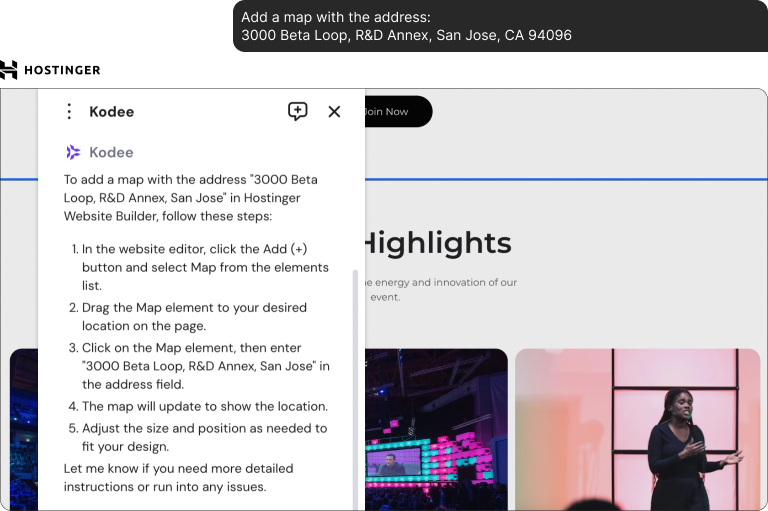
It also has an AI chatbot Kodee, however, it cannot make any changes to the website — it can only answer questions on how to perform a certain task and provide instructions. It can't follow our prompts.
AI functionality overview
AI assistant Kodee cannot perform tasks, so we tried to propose our prompts to different AI tools. We were able to create a map, a gallery, generate new images, and add a new section. The overall service is rather fast, but it wasn't able to place new elements as it was put in the prompt. For instance, the gallery has six images instead of eight, and the map was added to the top, not to the bottom.
From a business efficiency standpoint, Hostinger's built-in SEO and content tools can streamline early marketing efforts for lean startups. The resulting website gives a positive first impression, but upon closer inspection proves to be a bit generic
3. Brizy.io
Brizy is a multifunctional website builder that provides a cloud service and plugins for WordPress and Shopify.
First, Brizy's AI website builder suggested we import the information about our business from social media, or to fill it in manually.
Brizy presented us with a 4-step form, where we needed to fill in information about our type of business: its name and language, industry phone number, email, and description. The system can suggest ideas, but they aren't based on the information we put in previously.
After Brizy created a website, the system gives an option to regenerate either the entire page, or just some of its elements: images, typography, titles and texts, colours. However, there wasn't AI assistance for entering specific requests or commands. We chose an iteration of our website, and proceeded to the editor.
Brizy AI editor is limited to text generation only — it cannot create new images and only allow for manual website building.
AI functionality overview
Brizy had a primary website generation and regeneration, iterations are unlimited, but after you go to the editor you can only change the website manually. AI features are locked to text.
The website builder didn't use our prompt to get information about our desired colours palette, instead it chose a completely different one. It put our prompt in the front page instead. However, the generated website is filled with visual and textual content. Images aren't generated for our project specifically, but instead taken from Brizy's library. Unfortunately, you can't go back after you regenerated the version of the website. The AI inside of the editor only applies to text.
4. Squarespace.com
Squarespace is a popular website building and hosting solution for online stores and blogs.
Its AI website builder is called Blueprint AI.
When we clicked on 'Create a website', the system asked us what our website was going to be about, then about goals we wanted to achieve. After that, we could choose whether we wanted to start with a template, or with an AI website builder.
However, the AI features proved to be limited. Instead of generating a website, the system presented a questionnaire, which we had to fill out with the information. First, we entered the name of our business and the brand's personality. We couldn't enter our prompt into the system as it is, but we tried to replicate it by choosing similar options in the survey.
In the end, we got a blueprint with nothing relevant to our theme content. The builder itself doesn't have tools for image generation or AI website editing — it cannot add new elements, make changes to the website, or create alterations. Squarespace AI is limited to text generation only. It writes text based on your theme and brand identity; AI can also make rewrites of existing text.
With this kind of 'AI', it's fairly easy to create a blueprint—as the name of the program suggests—of a website. Squarespace gives users straightforward questions with limited options, but it can hardly be called AI generation, and the final website doesn't look complete. It still requires a lot of manual work to start resembling a finished project. The actual AI is only implemented in text generation.
AI functionality overview
Blueprint AI is not an AI website builder, it doesn't create a custom website — it only helps to choose templates. Squarespace doesn't have a real-time AI generation; images are taken from the website builder's gallery. Actual AI is limited to text generation and editing only.
So, Squarespace website builder helps users to find a starting point, but not beyond that. Its limited automation means entrepreneurs may still need creative professionals to fine-tune branding and design, which defeats the point of using an AI website builder.'
Site.pro
Site.pro is a flexible website builder with a variety of templates and payment gateways. It has recently added AI functionality to its builder. As the service claims, AI can create websites along with its content, generate SEO and text, as well as answer questions as an assistant.
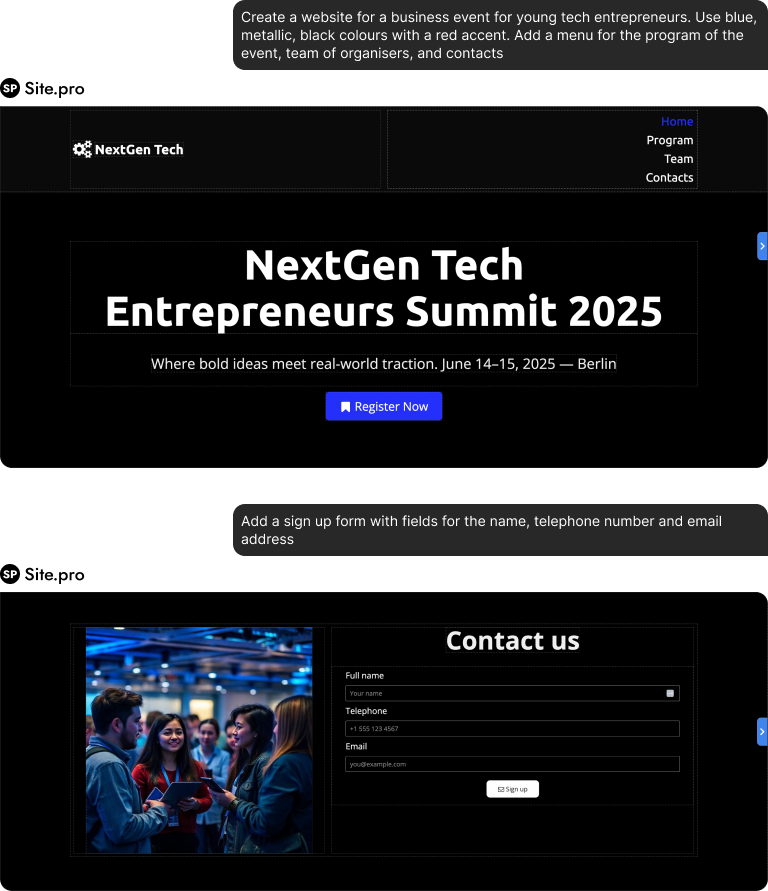
To create a website AI, we went to the 'AI Website Builder' page and enter our prompt in the text field. It is also possible to enter the prompt directly in the builder. In the chat, AI reported about the progress and sections being added.
Site.pro created a website with visual and textual content. After the website generation was done, we put the rest of our prompts in the chat:
- Add a map with address
- Add a filled 'comments' to contact form
- Add gallery with 8 images
- Add a section for reviews
Let's see how easy it is for AI to generate an image to replace the existing one:
'Change the 1st image of dog to a bunny in the gallery'
Site.pro also supports text and SEO generation. To generate text, we entered our business type, text topic, relevant keywords, and chose text length (up to 15 sentences). AI came up with three versions of the text. SEO information can be generated in the setting of a page, but not via chat.

AI functionality review
Unlike previous AI website builders we looked at, Site.pro doesn't start with a survey and allows users to enter the prompt directly. It can generate new sections of the website, create and move components, generate and replace images via chat commands. There is also an option to use voice input: it supports multiple languages besides English.
The AI assistant can apply changes to the website automatically, while the manual editing remains a possibility for quicker changes. It's worth noting that Site.pro's AI is not the fastest — generating new objects takes time.
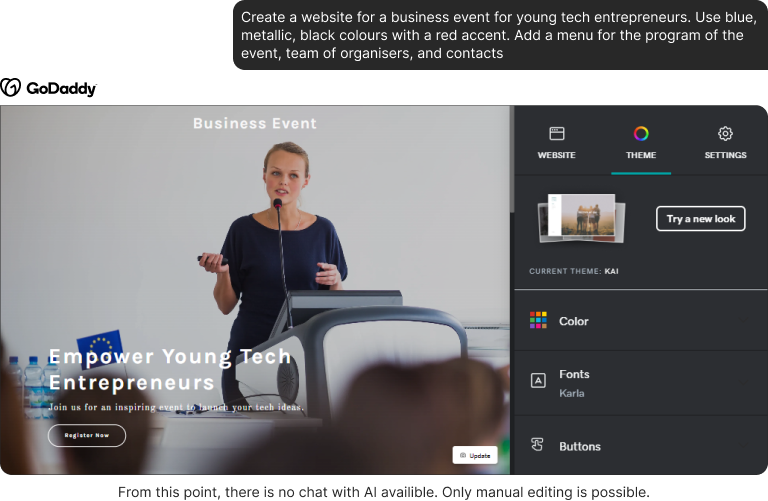
5. GoDaddy
Despite GoDaddy being a web hosting company and domain registrar first and foremost, it also has its own website building software with AI tools.
When we registered, the system asked what features our website needs. Then, it asked to choose a theme for a website out of the list'. In the end, it suggested telling more about the business for AI to generate a description. We put our prompt here.
GoDaddy generated a website, but didn't quite follow the proposed colour scheme. Still, the website looks complete and is filled with content.
At the baseline, the only AI tool available in the website builder is text generation. To generate images and logos, GoDaddy has a separate product called Airo Plus.
AI functionality overview
GoDaddy has a website and text generation, with image generation attributed to Airo Plus service that also comes with marketing tools, not directly related to building websites. Aside from that, the website builder can generate new sections from templates. One of the main weaknesses of this system is that the editor is not drag-and-drop — you can't easily create and move objects around the website. Most templates are set in stone in terms of their structure, which doesn't leave a lot of room for customisation.
6. Duda
Duda promotes its AI website builder as a quick way to launch and edit websites, with one of its selling points being 'create conversationally'.
The AI generated website has text, AI images, contact form. Duda gives options when it comes to regeneration: users can either regenerate the page, or just its content: edit prompts, images only, or images with text. When Duda AI created a website, it created multiple prompts based on our initial input. They can be seen in the 'Page Content' tab — each section of the website has a prompt for text.
The program provides a catalogue of layouts that AI will adapt according to the website's theme when picked. When the primary changes with AI are done, we can move to the actual editor.
Duda's editor has an AI assistant. It doesn't have chat to input commands or direct requests. Instead, it provides tools for automatic SEO, such as alt text for images and meta information. It can also create new pages based on existing templates with AI generated content. AI can also add sections: to test this out, we asked it to add a map, however, it only gave us a contact form.
Duda's AI assistant has an option to suggest which pages users could add to their websites. It offers multiple variants, and after users choose one, it generates a page, which can be added immediately to the website or saved in drafts.
AI functionality review
Duda generates a website with content, AI images, text, and options to regenerate pages partially or completely. It has AI text, pages, and SEO generation, but lacks tools for precise website management via AI. The AI assistant doesn't have a chat, so we can't share our requests with it directly, or ask it to make subtle changes, add buttons, etc. When it comes to building websites, its functionality is bound to page generation, SEO, and text.
Being able to set up SEO with AI is beneficial for online business growth, but Duda's solution still requires a lot of manual input to truly shine, which is not ideal when the time is tight.
7. Shopify
Shopify is a big platform, as its name suggests, for creating and operating online stores. It comes with a website builder that has AI implementation as well.
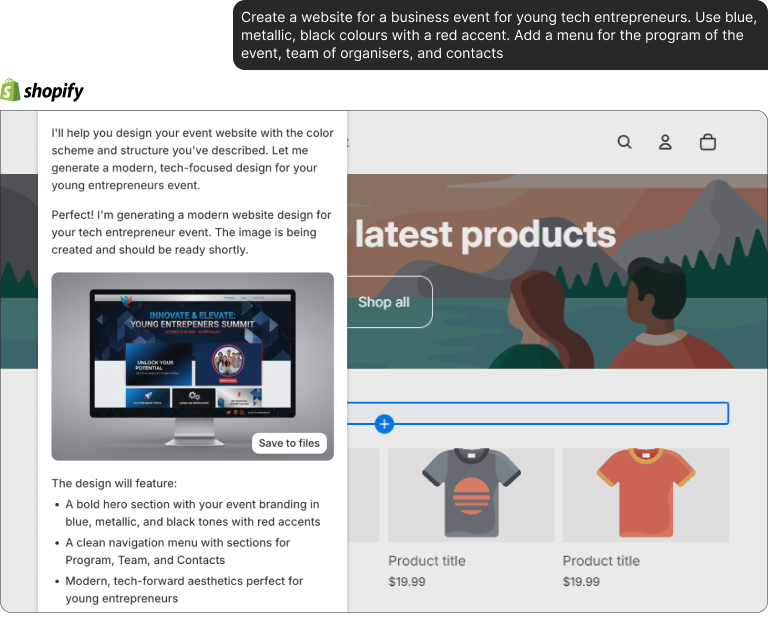
We can create a custom theme by inputting our prompt. Setup guide on Shopify comes in the form of chat, where we enter the rest on our prompts. It couldn't create a theme with our particular requirements in terms of colours and initial layout, only an example of a wireframe.
- Add a map with address 123 Main Street, New York, NY to the before footer
- AI adds a section for maps. It does it through code generation, but the block itself remains customisable even without code.
- Add a filled 'tel. number' 'comments' to contact form →(on contacts page)
- Shopify's standard form can't be modified via chat automatically, we have to create a custom form.
- Add gallery with 8 images of cats and dogs
It adds a gallery, but images need to be generated separately. Generated images have to be put in the gallery manually. It cannot replace images on its own either.
Add a section for reviews from pet patients on home page
AI generates a code for the section, and adds text for reviews as well.
Like alternatives, Shopify AI can generate and rewrite text in different tones of voice and lengths.
AI functionality overview
Spotify's AI builder can generate a custom theme, but not a website from scratch. Aside from generic features such as text and section generation, it has an AI assistant. AI Assistant is able to generate new images and components, as well as answers users' questions. Commands can be input by text or by voice. It is a great solution for e-commerce, but is limited beyond that.
Important note! Shopify doesn't have auto-save, which led us to lose one of the designs during the process of testing.
Key Takeaways
| Website generation | AI Text | AI Images | Section generation | Editing with AI | Editing with voice |
Wix | + | + | - | + | - | - |
Hostinger | + | + | + | + | - | - |
Site.pro | + | + | + | + | + | + |
Squarespace | - | + | - | - | - | - |
Brizy | - | + | - | - | - | - |
GoDaddy | + | + | + |
| - | - |
Duda | + | + | + |
| - | - |
Shopify | - | + | + | + | + | + |
As of now, AI website builders remain, for the most part, limited.
AI website builders are reshaping how businesses approach online growth. They reduce upfront development costs, shorten time-to-market, and allow founders to test ideas quickly.
However, even big players present the website and text generation at best, while image generation is widely available, it is controllable in few programs. Most website builders use libraries instead of generating content on the spot. It makes websites look rather professional on the first glance, but lifeless and generic when you look more closely, which can hurt brand's identity and give a cheap impression. To truly get a professional result with character, manual editing is necessary.
Each AI website builder has its upsides and downsides, with Site.pro and Shopify standing out as examples of responsive solutions, combining AI with comfortable and intuitive manual editing. They were the ones that followed our prompts the closest, as well as being the only website builders with possibility of editing through chat. Shopify, however, is limited to specifically creating online stores, and its initial generation isn't the strongest, so it won't do as a tool for landings and personal business pages.
Site.pro and Shopify are also the only, as of now, website building programs that support voice input. In Site.pro, we were able to manipulate the entire website with voice commands.
It would also be fair to mention Hostinger with its wide range of fast AI tools and high quality AI writing.
It seems like website building is becoming more and more automated. The technology itself needs polishing, but it's clear that with the speed of AI development, in a half of year we will probably be looking at completely hands-off web design.